Explicit Deny
Explicit Deny (Blocked Countries)
- Selected countries are added to the Blocked Countries list.
- Traffic originating from the blocked countries is denied.
- Traffic from all other countries is allowed by default. Example: Frontend VHTTPS_CRM configured with Explicit Deny will block traffic only from the specified blocked countries, while allowing traffic from all remaining regions.
Use case:
Block traffic from specific regions/countries while allowing global access.
Apply Explicit Deny on a Frontend
- Navigate to Geo Restrict. Click on Geo Restrict from the left navigation menu.
- Locate the required frontend server from the list for which you want to enable Explicit Deny.
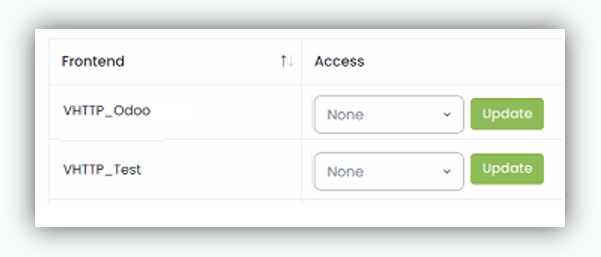
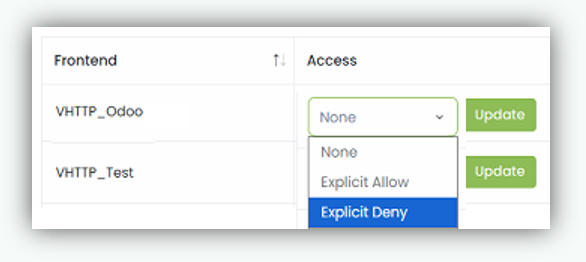
- Select Explicit Deny from the drop down menu.
- Click Update to save.
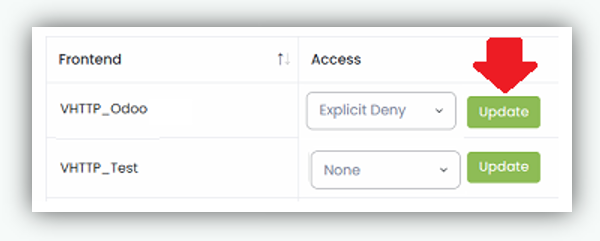
After completing the Geo Restrict configuration, the selected policy (Explicit Allow or Explicit Deny) is applied to the chosen frontend server.
Scope
- Geo Restrict Explicit Allow/Explicit Deny are applied per frontend server.
- You cannot apply both Explicit Allow and Explicit Deny on the same frontend at the same time.
- The policy is enforced on incoming client connections before traffic is forwarded to backend servers.